How to Source Obsolete Industrial Parts: 2026 Guide

How to Find Obsolete Parts: Step 1, Confirm What You Are Actually Dealing With
A machine is down, the part number returns nothing at the OEM, and the line is losing output by the hour. Sourcing obsolete industrial parts starts with classification, not with a search bar.
At Automa.Net, we see this daily across our network of 700+ suppliers and 14.8 million+ in-stock products. The buyers who resolve shortages fastest are the ones who classify first.
Obsolete industrial parts are components a manufacturer no longer produces or actively supports, while still being needed to keep existing machinery running. The distinction matters because "obsolete" is not one condition.
Obsolete, Discontinued, Surplus or End-of-Life: Why the Label Changes Your Sourcing Route
Each status points to a different supply route. Get the label wrong and you waste days in the wrong channel.
| Status | What It Means | Where to Look First |
| Active | Still produced and stocked | OEM or authorized distributor |
| End-of-life | Production ending, last orders possible | OEM last-time buy |
| Discontinued | No longer manufactured | Specialist distributors, surplus stock |
| Obsolete | Superseded, unsupported | Broker market, refurbished, alternatives |
| Surplus | Unused overstock from another plant | Marketplaces, other machine builders |
A discontinued Siemens module sitting in another plant's stores is not obsolete at all. It is surplus, and it is often the fastest and cheapest route to getting the line running.
Capture the Exact Part Data Before You Search for Industrial Spare Parts
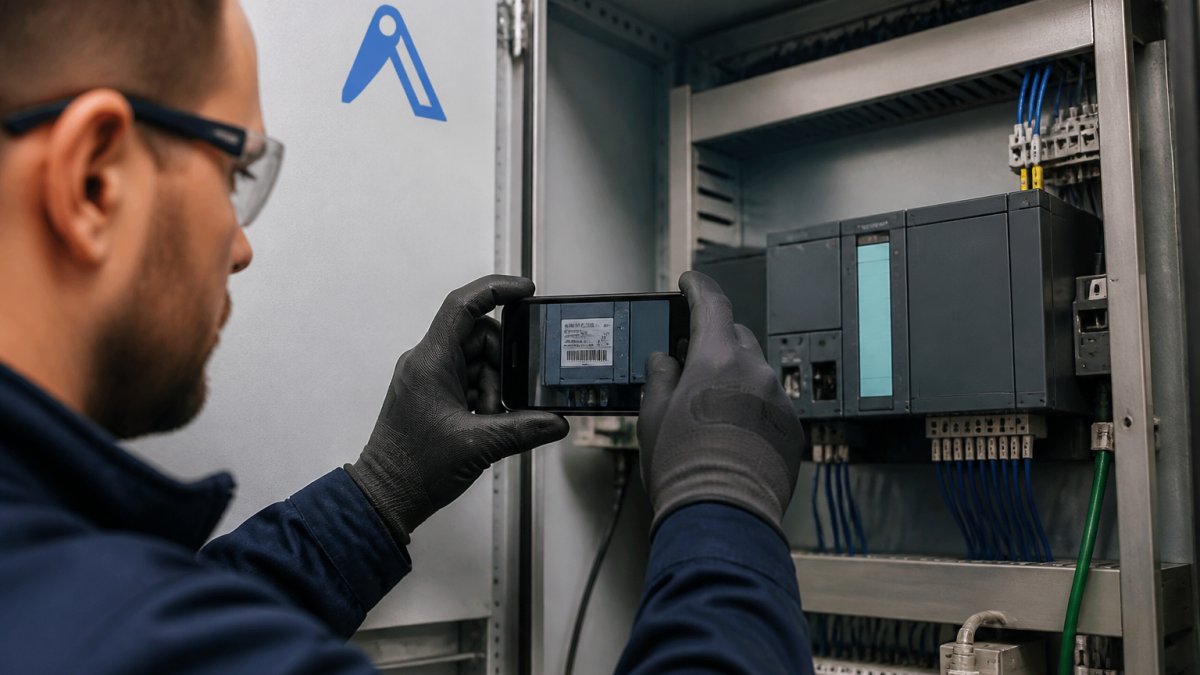
Searching with the wrong data is the most common reason buyers come back empty-handed. A family name like "Siemens S7-300" returns thousands of hits. A full order number returns the exact module.
Nameplate Data, Revision Numbers and the Details Buyers Forget
The nameplate is your primary source. Photograph it in good light before you touch anything else. Then capture the details buyers routinely skip:
- Full order number, not just the type designation
- Revision or firmware level
- Hardware version and any suffix codes
Revision numbers decide compatibility. Two modules can share a type code and still not swap cleanly if the firmware generation differs.
Where to Search for Obsolete PLC Parts and Legacy Automation Components
Legacy automation components rarely sit in one place. The supply is scattered across distributor shelves, broker inventories, and other plants' spare stores.
Start with the OEM or its authorized distributors to confirm the part is genuinely discontinued. Then widen out.
This is where a parts search engine that spans many suppliers saves days. Instead of emailing twenty distributors, you search one network. AutomaSEARCH lets you search across our supplier network by part number and see real, in-stock inventory rather than catalogue listings.
If nothing turns up, broadcast the requirement. The Request Board sends your RFQ to the whole network at once, so suppliers with the part can come to you.
Replacement, Repair or Redesign: Comparing Your Options
Finding the exact part is not always the best answer. Sometimes a compatible alternative, a repair, or a redesign is faster and cheaper over the life of the machine.
| Option | Best When | Main Trade-off |
| Exact obsolete part | Form, fit and function must match | Scarce, price can be high |
| Compatible or successor part | OEM offers a documented successor | Needs re-parameterisation |
| Repair or refurbishment | Failure is local, core is sound | Turnaround time, warranty terms |
| Redesign | Part is truly gone and failure repeats | Engineering cost, downtime to fit |
Reverse engineering and 3D printing can cover mechanical parts like brackets, covers, and simple housings. They are poor fits for anything with electronics, firmware, or safety certification.
Run a total cost comparison, not a unit price comparison.
Industrial Spare Parts Supplier Verification: How to Vet Before You Order
A listing proves nothing. On obsolete automation stock, the supplier's sourcing channel and inspection capability matter more than the catalogue photo, because the same part number can arrive as new old stock, a pulled unit sold as new, or a refurbished module with a replaced capacitor. Verification is what separates a reliable supplier from an expensive lesson, and it has to happen before money moves.
What to check on the supplier, not just the part
Work through these in order. Each one is a filter, and a supplier that fails an early filter rarely survives the later ones.
Find it on Automa.Net →
- Legal identity and trading history. Ask for the registered company name, registration number, and VAT identification number, then confirm them against the national commercial register. A trading name that does not resolve to a registered entity is a stop signal, not a detail to sort out later.
- Sourcing channel. Ask directly where the unit came from: OEM last-time buy, authorized distributor overstock, another plant's surplus, or broker market. Suppliers who cannot describe their channel usually cannot describe the part's history either.
- Inspection capability. Ask what they physically check before dispatch: visual inspection, connector and pin condition, firmware read-back, bench power-up. A supplier with a test bench answers this in specifics. A reseller answers it in adjectives.
Red flags that repeat across the market
A price far below the rest of the market is the most common warning sign, and it usually means a pulled part sold as new, or a unit with a known failure mode the seller is passing on. None of those are visible in a listing photo.
Other patterns worth treating as stop signals:
- Stock photos instead of a photo of the actual unit, with the order number legible
- Refusal to confirm the order number, revision, or firmware level in writing
- No physical address, or an address that does not match the registered entity
- Pressure to pay outside normal commercial channels
A vetting record you can reuse
Keep a short supplier file for every source you use, and update it after each order. Record the registered entity, the sourcing channel they declared, the documents they provided, the warranty terms, and the outcome of the last transaction.
If a single-channel search turns up nothing, the Request Board broadcasts your requirement to the whole supplier network at once, so vetted suppliers with the part can come to you instead of you chasing them.
Your Obsolete Parts Sourcing Checklist
Use this before you place any order for hard-to-find parts:
- [ ] Confirm lifecycle status with the OEM in writing
- [ ] Capture the full order number, revision, and firmware from the nameplate
- [ ] Search OEM, authorized distributors, then specialist and broker stock
- [ ] Broadcast an RFQ if single-channel search fails
Receiving Inspection and Acceptance Testing for Obsolete Industrial Parts
Inspection is not optional for obsolete stock, because the part may have sat on a shelf for years, been pulled from a decommissioned machine, or been refurbished without disclosure. What arrives may not match what was described, and the cost of finding that out on a running machine is downtime you did not plan for. Treat receiving as a gate, not a formality.
Incoming inspection: what to check before the part goes anywhere near the line
Do this at goods-in, with the packing note and your original order documentation side by side.
- Packaging and transit damage. Look for crushed corners, moisture ingress, and anti-static bags that have been opened and resealed. Original sealed packaging is a signal; a resealed bag is a question.
- Order number and revision match. Compare the nameplate on the received unit against the order number, hardware version, and firmware level you captured before ordering. A type code match with a different revision is not a match.
- Signs of prior fitting. Scratches around mounting holes, wear on terminal screws, disturbed warranty seals, resoldered joints, or flux residue. Any of these suggests a pulled or repaired unit sold as new.
- Corrosion and storage damage. Check connector pins, PCB edges, and any exposed metal. Long storage in a humid warehouse leaves traces that a photo will not show.
Acceptance testing: prove it works before it goes on the machine
A visual pass is not an acceptance test. Where the part allows it, bench-test before installation.
- Bench power-up. Apply the correct supply and confirm the unit initialises without fault codes.
- Firmware and configuration read-back. Confirm the firmware generation matches what the machine expects, and that any parameters you need can be loaded.
- I/O and communications check. For PLC modules, drives, and HMIs, verify the bus or network interface responds and that inputs and outputs behave as expected.
- Load behaviour where practical. A spare rack or test rig lets you confirm the unit holds up under load rather than only at idle.
Where bench testing is not practical, agree the acceptance criteria with the supplier in writing before the order ships, so there is a shared definition of what "working" means if the part fails early.
Keep the paperwork
Retain the packing note, the supplier's condition declaration, any traceability documents, and your test results. If the part fails inside the warranty window, this file is what turns a dispute into a straightforward return. It also feeds the supplier record you keep for the next shortage.
When you capture the nameplate with AutomaSnap before ordering, the exact order number and revision are already in your records, which makes the goods-in match a two-minute check instead of a hunt through emails.
What Comes Next
The next shortage is already coming. Parts get discontinued on a schedule you do not control, and the machine stays in service far longer than the OEM planned for.
That is where we help. AutomaSnap identifies a part from a photo of its nameplate, so you capture the exact order number without typing errors. AutomaSEARCH then finds it across our verified supplier network, and the Request Board broadcasts your RFQ when stock is thin.
Frequently Asked Questions
What information should you provide when sourcing a discontinued part?
Give the supplier the full manufacturer part number, the revision or firmware version, and the equipment model the part sits in. Add the function it performs and any fault codes. If the nameplate is unreadable, a clear photo helps: AutomaSnap reads nameplate data from an image and returns candidate part matches. Complete data cuts back-and-forth and reduces the risk of receiving a variant that fits mechanically but not electrically.
How do you verify an obsolete industrial part before buying it?
Work through four checks: part number and revision match, supplier documentation (photos of the actual unit, test records), traceability of where the stock came from, and agreed return terms. For safety-relevant components, ask for proof of functional testing. Never rely on a listing photo alone. A supplier who cannot show the physical unit or answer technical questions about it is a risk, regardless of how the price looks.
What is the difference between obsolete and surplus parts?
Obsolete means the manufacturer has stopped producing or supporting the part. Surplus means the part is still available new but is being sold from excess stock, often because a project was cancelled or a plant closed. The sourcing routes differ: surplus is a stock-liquidation question, obsolete is a lifecycle and alternatives question. Knowing which one you face tells you whether to search distributor inventories or start a redesign assessment.
Should you buy a refurbished or surplus industrial part?
It depends on the machine's remaining life and the criticality of the function. Surplus new old stock carries the least technical risk if storage conditions were good. Refurbished or remanufactured components can be a cost-effective route for drives and servo motors when the supplier documents the repair scope and test results. For safety functions, weigh the certification and warranty position before committing.
Find it on Automa.Net →
Other Posts

Spare Parts Vendor Management Strategies for Manufacturing
Vendor management strategies for spare parts in manufacturing: supplier scorecards, RFQ checklists and sourcing obsolete automation parts without long
Read More →
ABB Servo Motor Suppliers vs Direct Buying
Compare ABB servo motor suppliers with direct manufacturer purchasing. Learn how to verify suppliers, check part numbers and source obsolete drives.
Read More →
5 Best Practices for Tracking Obsolete Industrial Parts
Learn 5 best practices for tracking obsolete industrial parts, from risk scoring to sourcing tools that keep your production running.
Read More →