How to Verify Refurbished Servo Drive Compatibility

To verify servo drive compatibility, match the motor nameplate data to the drive's ratings, then confirm the encoder type, feedback wiring and firmware will work together. Check the full motor part number, not just the family name, and request the refurbisher's load test record before buying.
- Record the full motor part number, since one differing character can mean a different encoder or brake option.
- Compare the drive's rated output current against the motor's rated current with margin for the application.
- Connector pinouts are not universal across product series, even within one brand.
- Ask for full-load test results on a matched motor and a firmware version and parameter backup.
- Load the correct parameter set before commissioning, because copied parameters can trigger faults on first start.
Start With a Servo Drive Replacement Checklist
A stopped axis puts the whole line on hold, and servo drive compatibility with the motor already bolted to the machine decides whether the replacement fits. Verifying refurbished servo drive compatibility means matching nameplate data, feedback type, wiring and firmware before the unit goes into the cabinet.
Work through this checklist before you commit to any replacement:
- [ ] Motor model number and full part number recorded
- [ ] Drive model number and product series confirmed
- [ ] Voltage, current, power and speed ratings compared
- [ ] Feedback type and encoder specification matched
- [ ] Connector pinouts and cable shielding checked
- [ ] Firmware and parameter set confirmed as compatible
- [ ] Braking resistor and bus voltage requirements reviewed
- [ ] Refurbishment records and test protocol requested
A servo drive is the power stage that converts a speed or torque command into motor current. Compatibility is a chain of checks, and the weakest link decides whether the axis runs.
If you are still choosing a supplier, our guide to industrial automation parts sourcing covers how to vet vendors and spot fakes.
Read the Servo Motor Nameplate Data and Match It to the Drive
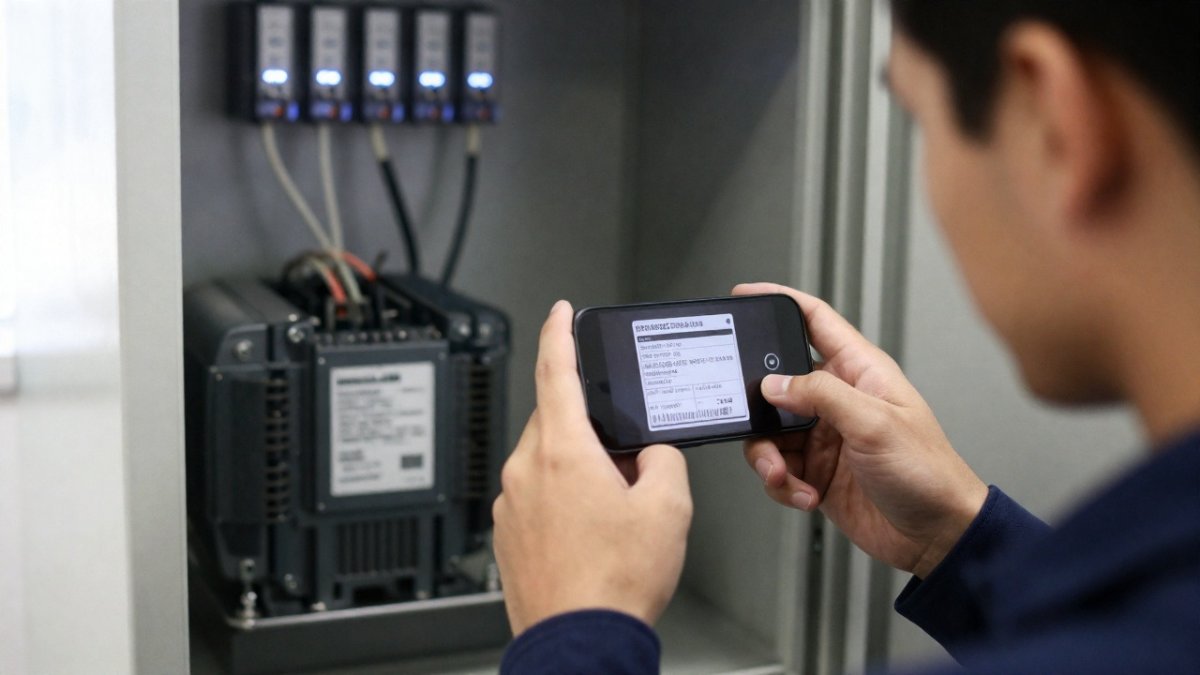
The motor nameplate is the primary source of truth for compatibility. Transcribe the model number, serial number, rated voltage, rated current, power rating, speed and torque exactly as printed.
A common mistake is matching only the motor family name. The full part number carries the winding, feedback and shaft variant, and one differing character can mean a different encoder or brake option. Photograph the plate rather than typing it, then compare the drive's rated output current against the motor's rated current, with margin for the application.
If the part number is worn or unreadable, capture it by photo with AutomaSnap instead of guessing. When no matching drive turns up in stock, post the exact requirement to the Request Board.
Confirm Servo Drive Encoder Compatibility and Feedback Wiring
Encoder compatibility decides whether the drive can read the motor at all, and it is the check most often skipped. The drive's feedback interface must support the encoder type fitted to the motor: incremental, absolute, resolver or a vendor-specific protocol.
Compare these points between motor and drive:
- Encoder type and resolution
- Supply voltage for the encoder
- Signal format and channel count
- Connector type and pin assignment
- Cable shielding and grounding arrangement
Connector pinouts are not universal across product series, even within one brand. A drive from the same family but a different generation may use a different feedback connector. Check the manual's terminal assignment, not the plug shape.
Swapping feedback wires to make a connector fit can destroy the encoder or the drive's feedback stage. If the pinout does not match the manual, stop.
Refurbished Servo Drive Testing and Configuration Checks Before Installation
A refurbished drive is only as good as the test record behind it, so ask for the functional test protocol before you buy. Reputable refurbishers run the unit on a test stand with a matched motor, under load, and document the results.
Request these records:
- Full-load test results on a matched motor
- Fault diagnosis and any repaired components
- Firmware version and parameter backup
- Braking resistor and bus voltage configuration
- Warranty terms and condition stated as new, surplus or refurbished
Firmware and parameter compatibility matter as much as hardware. A drive running older firmware may not support the motor's feedback option, and parameters copied from another machine can trigger faults on first start. Load the correct parameter set before commissioning.
If the unit is suspect, our industrial electronics repair services can bench-test or repair it before it goes into the cabinet. For legacy machines, these ways to extend equipment lifespan help you decide between repair and replacement.
| Option | Condition | Main risk | Best for |
| New OEM | Factory sealed | Lead time, cost | Critical axes, warranty needs |
| Refurbished | Tested, repaired | Test record quality | Fast replacement, known faults |
| Surplus | Unused, aged | Storage damage, firmware age | Obsolete part numbers |
A drive that fits on paper can still fail at commissioning if the test record is thin or the firmware is wrong. We built Automa.Net to close that gap: one material master export is read against live offers from verified suppliers, so you see the part, its condition and its price before you commit. Start with the MRO inventory optimisation overview and get the compatibility question answered before the line stops again.
Frequently Asked Questions
How do I check whether a servo drive is compatible with my servo motor?
Compare the motor nameplate against the drive's rated output current, voltage and supported feedback type, not just the power rating. The drive must supply at least the motor's continuous current and accept its encoder interface. Where the original model is obsolete, check the manufacturer's successor list for the same product series before you accept any substitute.
Can I replace a servo drive with a different model from the same manufacturer?
Often yes, but only within a documented successor chain. A different model may share the motor family yet differ in firmware, parameter sets, connector pinouts or braking resistor requirements. Ask the supplier for the exact model number, firmware version and a functional test record, then confirm the parameters can be transferred before you install it.
What should I ask a supplier before ordering a refurbished servo drive?
Ask for the exact model and part number, the condition (new, surplus, refurbished or used), the warranty terms and the functional test results, including whether the unit was run under load. Confirm the firmware version and that the encoder interface matches your motor. A supplier who cannot state these details in writing leaves you to absorb the risk.
Other Posts

Refurbished vs New Automation Components for MRO Spares
Refurbished vs new automation components compared on testing, warranty and traceability. Get the inspection checklist to verify before you buy.
Read More →
How to Optimize MRO Inventory for Uptime That Holds
Optimize MRO inventory for uptime with a practical audit, min-max levels and a critical spares policy. Free up frozen capital.
Read More →
Five Best Practices for MRO Spare Parts Procurement
Most MRO spare parts procurement problems start in the data, not the storeroom. Learn five practices that cut overpayment, duplicates and downtime.
Read More →